
Why have some of my photos disappeared?
Is adult content allowed?
Why have some of my albums disappeared?
Can I download an entire album?
How do I write blog articles?
How do I embed photos in my blog articles?
How do I add or remove a photo from a group?
What type of contributions can I add to a group?
How many groups can I join?
Can I leave a group of which I am the administrato…
When I leave a group, must I leave my contribution…
Why have some photos disappeared from a group?
How do I create a group? (will be provided soon)
8.8 Why do I need to provide 7 languages?
When I add someone to my contacts are they informe…
How do I block a member?
How do I use the internal ipernity mail system?
How do I deactivate or delete my account?
Image10.2
How do I use the search feature?
Where can I find more help?
FAQ
Index
How to report a copyright infringement?
Can I restrict who is able to view and download my…
Can I hide my name, my age, my details?
How do I import from Flickr?
Which type of documents can I upload?
Is the amount of content that I can upload or publ…
How do I upload photos and other content?
Can I login with my Google, Facebook, Yahoo or Ope…
How do I change my password?
How do I change my login email address?
What can I do if I have forgotten my password?
How do I register for a free trial?
Are there notes on getting started?
How do I renew a subscription?
How do I subscribe?
What subscription plans does ipernity offer?
Is ipernity a free or a paid service?
What is ipernity?
Questions fréquentes
Où puis-je trouver de l'aide supplémentaire ?
Comment utiliser la fonction de recherche ?
Image10.2
Keywords
Authorizations, license
-
Visible by: Everyone -
All rights reserved
-
1 100 visits
How to change the photo license?


← Back to Index
1) Go to the photograph.
▔▔▔▔▔▔▔▔▔▔▔▔▔▔▔▔▔▔▔▔▔▔▔▔▔▔
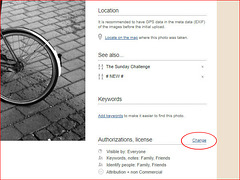
2) Click on "Change" to the right of "Authorizations, license".
▔▔▔▔▔▔▔▔▔▔▔▔▔▔▔▔▔▔▔▔▔▔▔▔▔▔
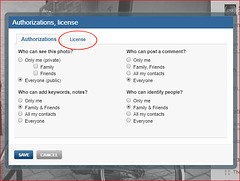
3) Click on the "License" tab.
▔▔▔▔▔▔▔▔▔▔▔▔▔▔▔▔▔▔▔▔▔▔▔▔▔▔
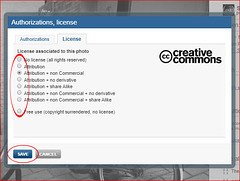
4) Select one of the license options in the provided menu by clicking on the circle to its immediate left.
▔▔▔▔▔▔▔▔▔▔▔▔▔▔▔▔▔▔▔▔▔▔▔▔▔▔
5) Click on "SAVE".
1) Go to the photograph.
▔▔▔▔▔▔▔▔▔▔▔▔▔▔▔▔▔▔▔▔▔▔▔▔▔▔
2) Click on "Change" to the right of "Authorizations, license".
▔▔▔▔▔▔▔▔▔▔▔▔▔▔▔▔▔▔▔▔▔▔▔▔▔▔
3) Click on the "License" tab.
▔▔▔▔▔▔▔▔▔▔▔▔▔▔▔▔▔▔▔▔▔▔▔▔▔▔
4) Select one of the license options in the provided menu by clicking on the circle to its immediate left.
▔▔▔▔▔▔▔▔▔▔▔▔▔▔▔▔▔▔▔▔▔▔▔▔▔▔
5) Click on "SAVE".
- Keyboard shortcuts:
Jump to top
RSS feed- Latest comments - Subscribe to the comment feeds of this photo
- ipernity © 2007-2026
- Help & Contact
|
Club news
|
About ipernity
|
History |
ipernity Club & Prices |
Guide of good conduct
Donate | Group guidelines | Privacy policy | Terms of use | Statutes | In memoria -
Facebook
X
